Case Study · Enterprise UX · Functional Prototype
Powersports VIN Model Lookup
Turning a 600-page manual search into a VIN-assisted decision tool
At my job, employees regularly need to identify the exact powersports model required for a vehicle valuation. The existing process depends on manually searching a 600+ page PDF containing more than 10,000 motorcycle and powersports models using Ctrl+F. I designed a web-based lookup tool that decodes a VIN, uses the available vehicle information to narrow the database, surfaces the most likely model matches, and gives employees enough context to verify the exact model themselves.
Role
UX / Product Designer
Project Type
Internal Workflow / Enterprise UX
Responsibilities
Workflow Analysis · Information Architecture · Interaction Design · Functional Prototyping
Status
Working Web Prototype
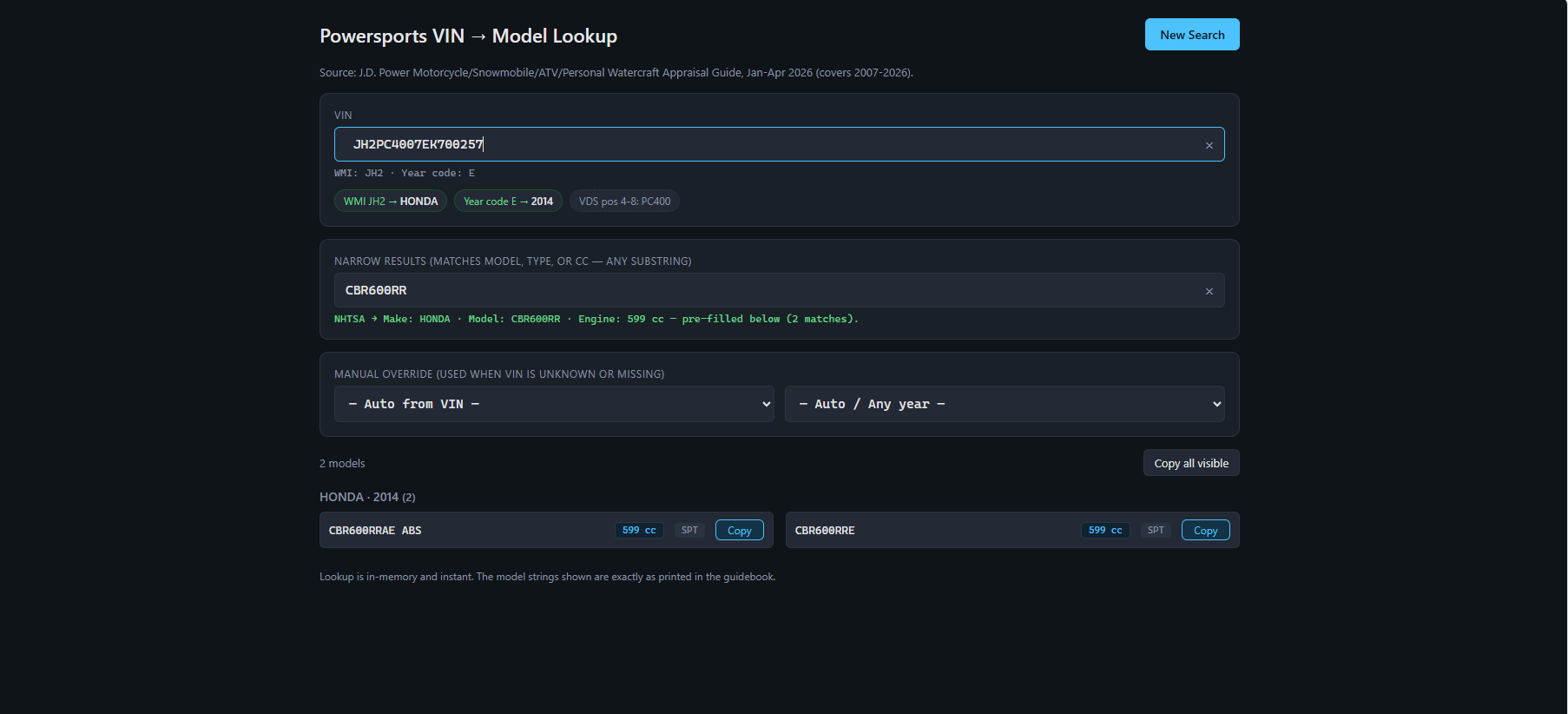
VIN → decoded data → likely models → human verification
600+
pages in the reference document
10,000+
powersports models
Daily
workflow usage
1 exact
model required per valuation
The Problem
Finding one exact model should not require searching 600 pages.
During the valuation workflow, employees receive vehicle information and must identify the exact model name used by an internal powersports reference guide. The guide contains more than 10,000 models across more than 600 pages.
The existing workflow relies heavily on opening the PDF and using Ctrl+F. At first, this sounds straightforward. In practice, it creates significant friction.
Many model names are abbreviated. Manufacturers often have several nearly identical model variants. Information received with the valuation does not always use the same terminology as the reference document. A search may return many possible matches — or none at all.
Employees then repeat the search using different abbreviations, model fragments, engine sizes, or naming variations until they locate the correct entry.
The problem was not that the information didn't exist. The problem was how much effort it took to find the exact information required.
Existing Workflow
The existing workflow
Receive valuation request
Read VIN / year / make / model information
Open 600-page PDF
Ctrl + F
Guess which model term or abbreviation to search
Useful result?
↺ If no useful result — repeat
↺ Try another abbreviation
↺ Search a shorter model fragment
↺ Search engine size
↺ Scroll through similar models
Compare similar model variants manually
Identify exact reference-guide model
Return to valuation workflow
Friction Analysis
Four sources of friction
Repeated searching
A failed search doesn't end the task. It starts another round of guessing.
Inconsistent terminology
Model names and abbreviations in the reference guide may differ from the information supplied with the valuation.
High cognitive load
Employees must interpret many similar model variations while remembering information from the valuation.
Precision matters
The goal is not simply to identify the motorcycle. The employee must locate the exact model terminology required by the valuation workflow.
Employees already had useful information about the vehicle. The existing interface simply wasn't using that information to reduce the search.
Design Question
How might I use information already available in the valuation workflow to reduce thousands of possible models to a manageable set of likely matches?
The opportunity was not to create a better version of Ctrl+F.
It was to redesign the decision path.
Core UX Strategy
Don't make the employee search better. Reduce what they have to search.
Use automation to narrow the decision space — not to hide the decision from the user.
The Solution
A VIN-assisted model lookup workflow
I designed a web tool that uses the VIN as the starting point rather than asking employees to begin by guessing model terminology. The VIN is decoded using NHTSA's vPIC vehicle decoder. Available vehicle data is then compared against the powersports model database to narrow the possibilities.
1
Enter VIN
Paste the VIN already supplied with the valuation.
2
Decode the vehicle
Retrieve available vehicle information through NHTSA vPIC.
3
Use decoded attributes
Use manufacturer, model year, vehicle description, and engine information to narrow possibilities.
4
Compare against the database
Search only the models that could reasonably match.
5
Surface likely candidates
Present a small set of probable matches instead of thousands of records.
6
Verify the exact model
The employee reviews candidate details and makes the final selection.
Product Walkthrough
From VIN to likely matches
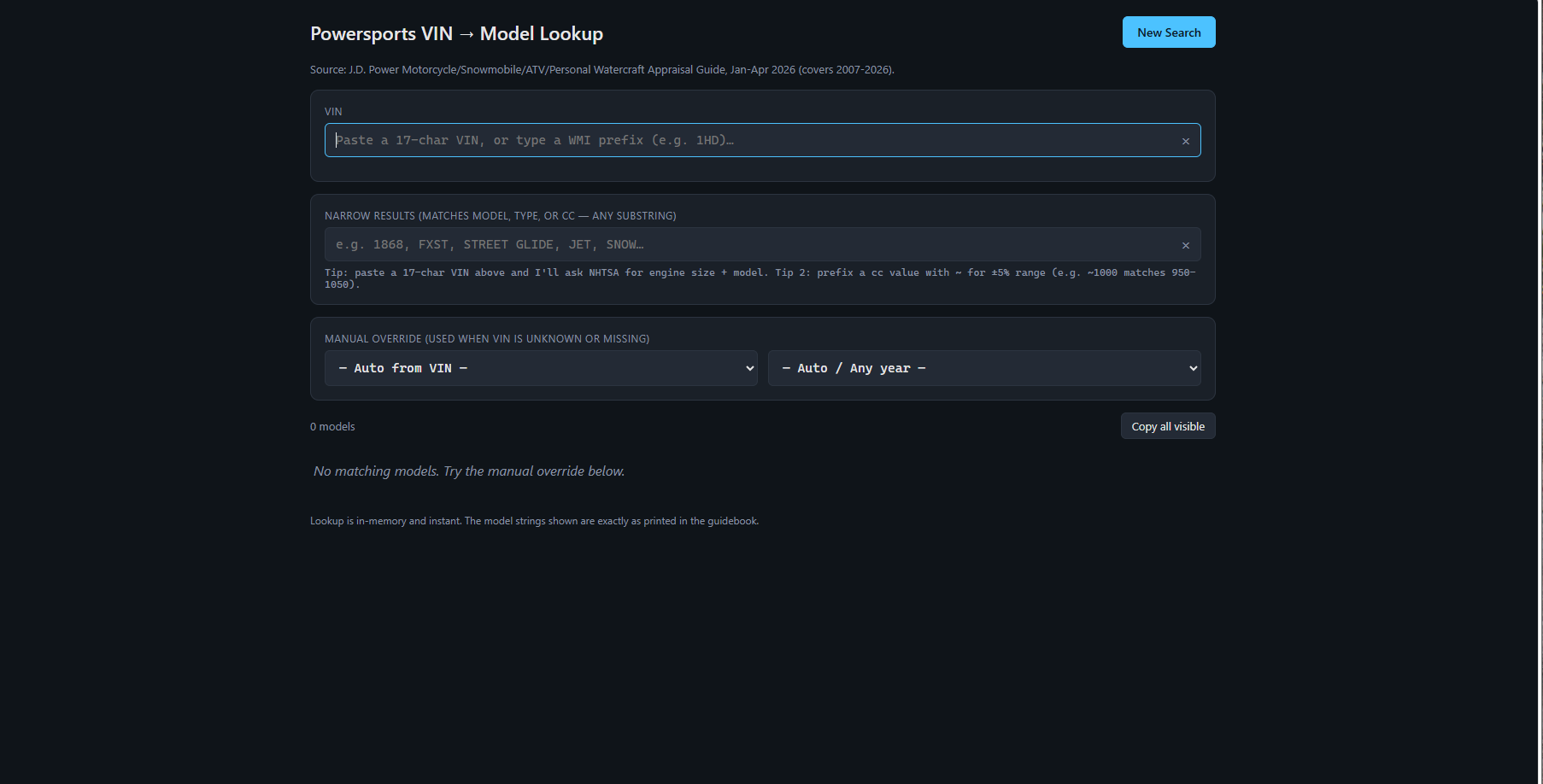
Start with objective information
The workflow begins with the VIN rather than requiring the employee to guess the reference guide's abbreviation.
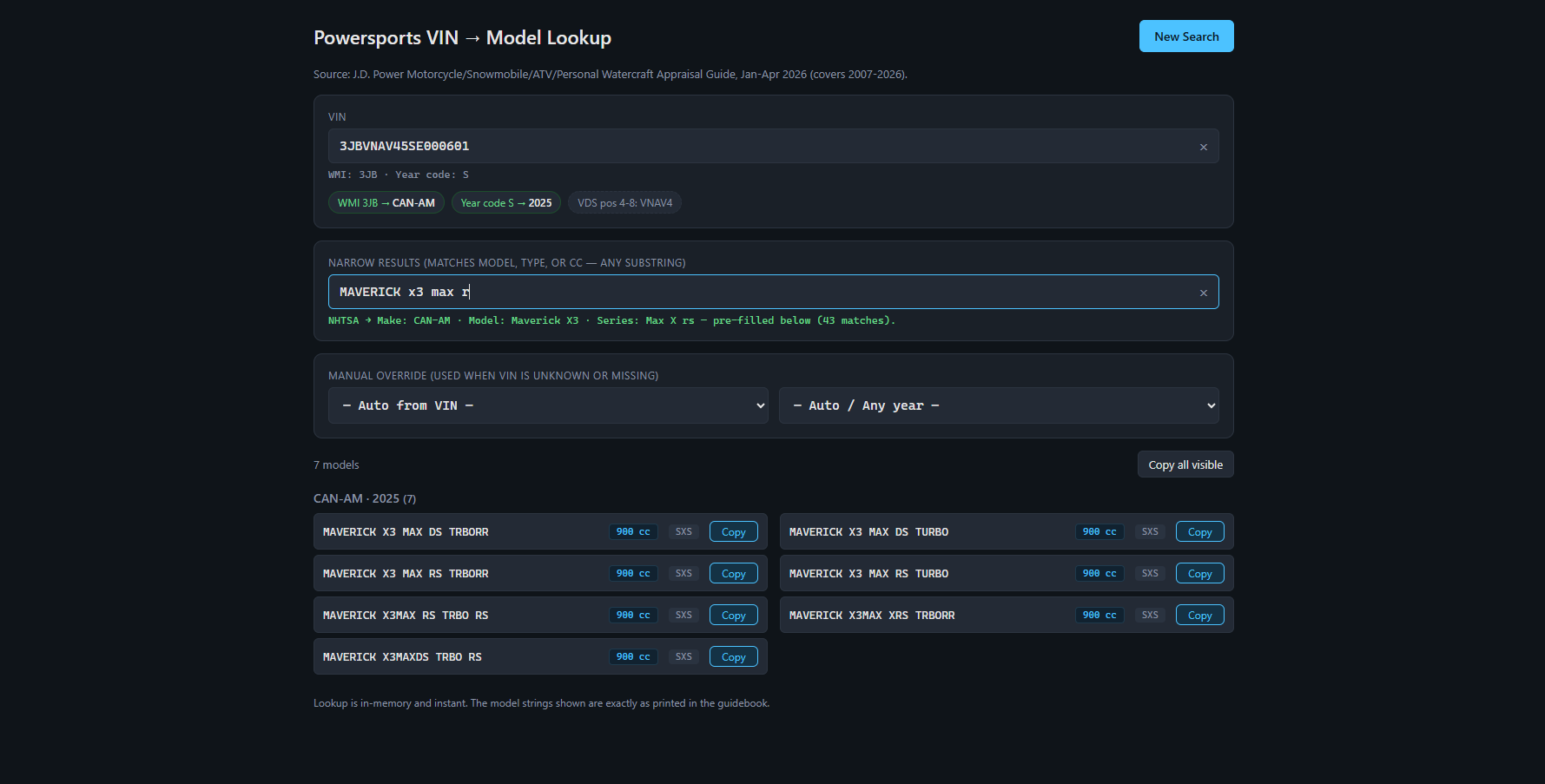
Use available vehicle data to narrow the search
Decoded information provides additional context before the employee has to make a model decision.
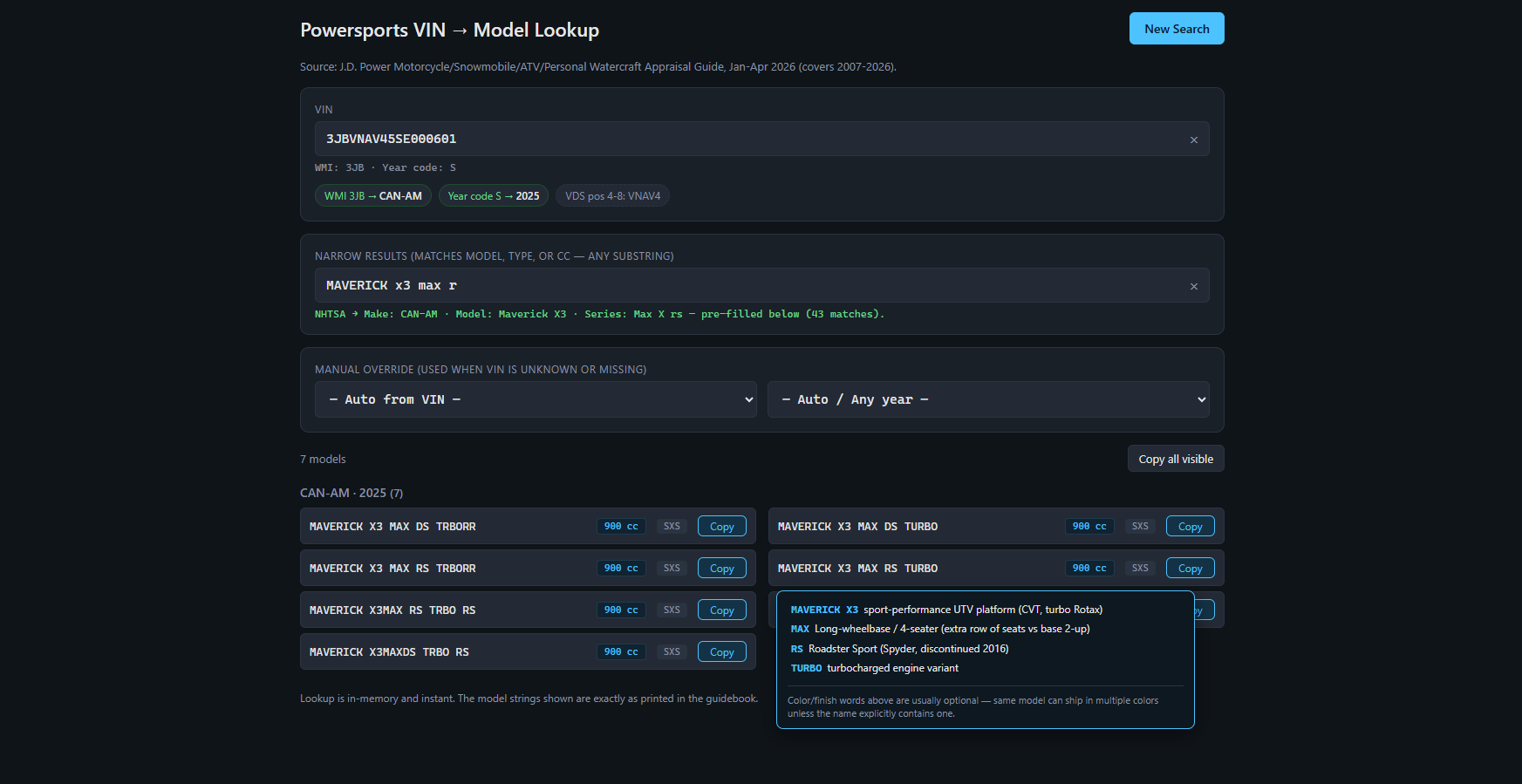
Replace thousands of records with likely candidates
The tool returns the models most likely to match the decoded vehicle rather than exposing the entire database.
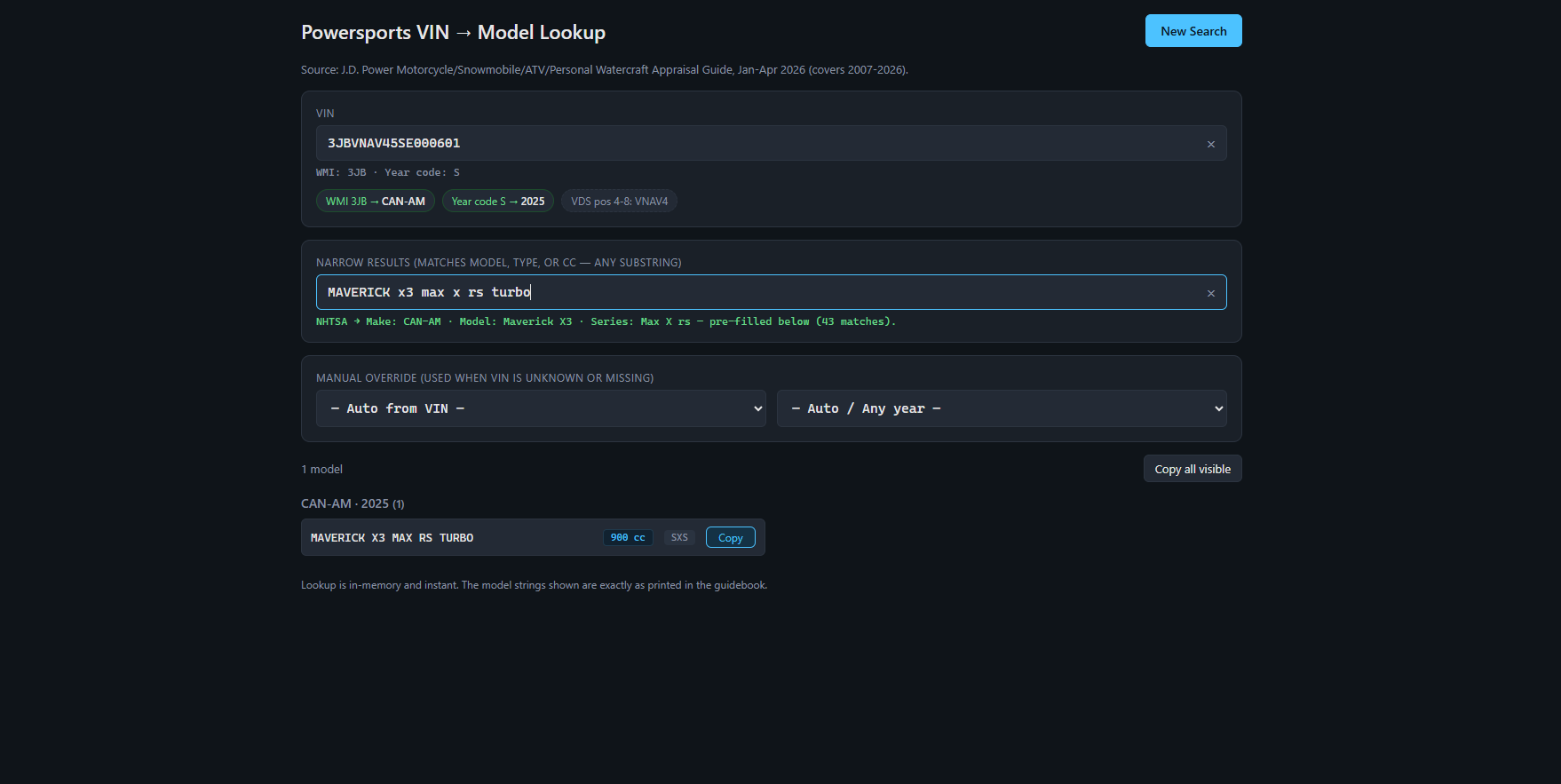
Reveal enough context to distinguish similar models
Employees can move through candidate results and inspect additional information to determine which model variation is correct.
Designing for Ambiguity
VIN decoding narrows the answer. It doesn't always determine it.
One important design constraint was uncertainty. VIN data can identify a great deal about a vehicle, but it does not always map perfectly to the exact model terminology used in the valuation reference guide. Closely related models may share many of the same attributes.
Presenting one result as definitively correct could create false confidence. Instead, I designed the system to surface the strongest candidate matches and give the employee additional information to compare them.
The interface supports the employee's judgment rather than pretending the system can replace it.
Example of the Ambiguity Problem
Conceptual illustration of the decision reduction — representative example only
PDF Search
CBR1000RR
CBR1000RR ABS
CBR1000RR SP
CBR1000RA
CBR1000RR — Year variant A
CBR1000RR — Year variant B
Which one matches the vehicle?
↺ Try different term ↺ Try again ↺ Try again
VIN-Assisted Lookup
VIN decoded
Manufacturer: Honda
Model year: Example year
Engine info: Available decoded data
Likely matches
CBR1000RR SP
View detailsCBR1000RR ABS
View detailsDesign Decisions
Four decisions that shaped the workflow
Decision 1
Start with the VIN, not a search term
The old workflow begins with a language problem: "What should I type into Ctrl+F?" The redesigned workflow begins with objective information already supplied with the valuation — the VIN. Using the VIN reduces the amount of terminology the employee has to remember or guess.
Old
Employee interprets vehicle → guesses search phrase → searches PDF
New
VIN → decoded information → relevant candidate models
Reduce recall. Increase recognition.
Decision 2
Use external data as assistance, not authority
The tool connects to the NHTSA vPIC decoder to retrieve available vehicle information. That data is useful for narrowing the search, but the valuation reference data remains important because its model terminology is what the employee ultimately needs. The tool therefore uses decoded information as an input to the matching process rather than treating it as an unquestionable final answer.
The goal was not to replace one data source with another. It was to use both sources to reduce uncertainty.
Decision 3
Keep the human in the decision loop
When multiple models remain plausible, the system exposes candidate information rather than automatically selecting one. This gives employees the context needed to distinguish subtle differences between similar vehicles.
System responsibility
· decode
· filter
· narrow
· surface candidates
Employee responsibility
· compare
· interpret
· verify
· select exact model
Decision 4
Progressive disclosure keeps complexity manageable
The full dataset contains thousands of model records and a large amount of detail. Showing everything at once would recreate the same cognitive overload as the PDF. The interface instead presents the most important candidate information first, while allowing additional details to be reviewed when needed.
Candidate name
↓ inspect
Additional model details
↓ compare
Confidence in selection
Show enough information for the current decision. Reveal more when the user needs it.
Designing for Imperfect Inputs
Real workflows don't always provide ideal data
Operational tools have to work when information is incomplete. VIN decoding may not always return every useful field, and some valuation tasks may require additional manual narrowing. The design therefore avoids making the automated path a dead end.
VIN provides strong match
VIN decoded
Candidate results surfaced
Employee selects exact model
VIN data incomplete / ambiguous
Partial decode
Employee uses available model info
Results continue narrowing
Automation should accelerate the workflow without making the workflow dependent on perfect automation.
Before vs. After
Before
Manual PDF search
· Open 600+ page guide
· Press Ctrl+F
· Guess model terminology
· Search again if no useful result
· Compare many similar variants
· Return to valuation system
↺ Repeated search loop ↺
After
VIN-assisted decision support
1. Enter VIN
2. Decode available vehicle information
3. Automatically narrow the model database
4. Review most likely candidates
5. Inspect additional details
6. Select exact valuation model
Linear path to the decision
Instead of improving Ctrl+F, I redesigned the path to the decision.
Working Product
From workflow observation to functional product
This project moved beyond wireframes. I created a working web prototype that performs the VIN-assisted lookup workflow and can be tested in a browser.
Launch Live DemoFunctional prototype · Browser based
Validation
Evaluating the workflow
Because this project grew from a workflow I perform in my own work, I could compare the new interaction directly against the existing manual process. The prototype can be evaluated using representative valuation tasks to examine:
How quickly the employee reaches a manageable set of candidates
How many manual searches are required
Whether closely related models can be distinguished
Where decoded information is incomplete or ambiguous
Whether additional candidate information helps the final decision
Task: Find exact model
→
Old: PDF / Ctrl+F
vs.
Prototype: VIN-assisted
→
Compare: Time · Search attempts · Ambiguity · Accuracy
Future Measurement
What I would measure next
Lookup time
Time from receiving vehicle information to identifying the exact model.
Search attempts
Number of manual search queries needed before reaching the correct candidate.
Candidate count
How many possibilities remain before final verification.
Selection accuracy
Whether the selected model matches the required reference entry.
A structured benchmark using representative valuation tasks would allow the redesigned workflow to be compared directly with the PDF-based process.
Reflection
What this project changed about the way I think about internal tools
1
Repetitive work is often a UX problem
Employees can become very skilled at working around inefficient systems. Familiarity does not mean the workflow is well designed.
2
Use information the user already has
Before asking users to search, type, remember, or interpret more information, look for data that can reduce the decision space automatically.
3
Automation should support judgment
In ambiguous workflows, the best system may not make the final decision. It may make the final decision easier.
4
Internal tools deserve the same UX rigor as customer products
Small improvements to a frequently repeated task can meaningfully reduce cognitive effort and frustration.
The goal wasn't to automate the employee.
It was to automate the searching around the employee's decision.
The redesigned workflow handles the repetitive filtering work while keeping the employee in control of the final model selection.
Powersports VIN Model Lookup
Role
UX / Product Designer
Project Type
Internal Workflow / Enterprise UX
Responsibilities
Workflow analysis · Information architecture · Interaction design · Decision-support design · Functional prototyping
Status
Working prototype